TikTok Ads Manager Campaign & Pixel Setup 2023

TikTok Ads Manager Campaign & Pixel Setup 2023


In this post we are going into details about how to access TikTok Ads Manager, setup a campaign, create the pixels, and place pixels on your website. We discuss the strategy behind the different optimization options, and best practices to get the best results for your campaign.

We have updated the process for Fall 2023, with an accompanying video to view the details.

Login and Advertising Credit


Visit TikTok Ads Manager to access the platform. For a comprehensive help guide from TikTok visit their help section.

I have clicked on login as I have already done the registration process.

The first thing I want to point out is that TikTok is giving new advertisers an ad credit worth up to $1,500 if you spend $1,500 in advertising. We found this by searching “new advertiser credit tiktok” in November 2023. 

We’ll jump right into the platform.
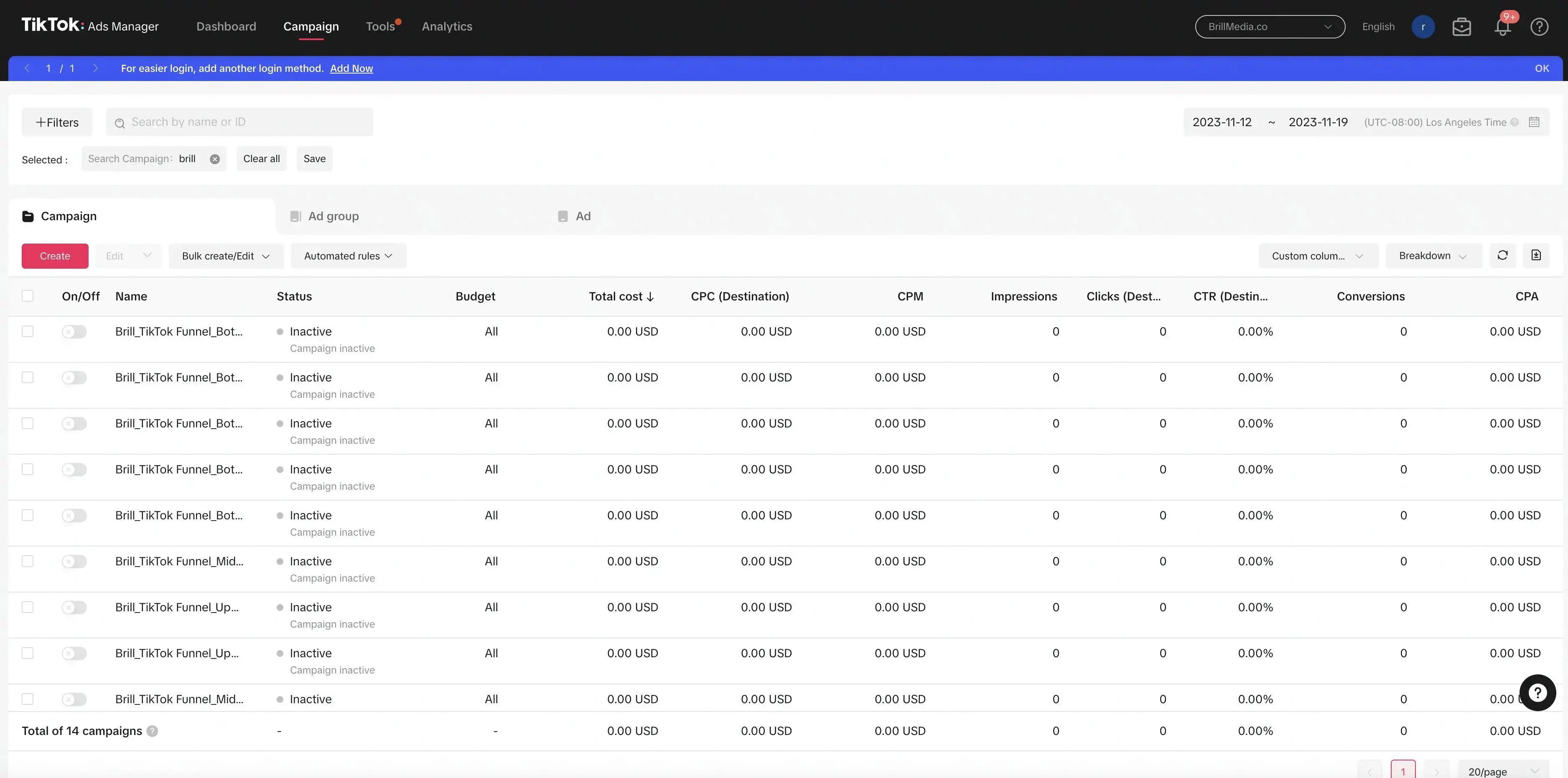
Create A Campaign

Set Your Advertising Objective

I’m going to click on Create a Campaign. 

Click on Create.

So the first thing is you can choose either a new campaign or use an existing on.

And there’s a lot of similarity here with Facebook. This is not surprising. Why reinvent the wheel if you don’t have to?

What I want to point out here is you’re buying on an auction, which means you are bidding based on supply and demand. This is the sort of basics of the programmatic advertising ecosystem, and you have a few different types of objectives. And the objectives are important because the objective tells the platform what you want to accomplish.


Set Ad Group

After clicking the Create button, you’ll see a screen with a number of options. First, select your objective. Then, scroll down for more options. 

Split testing helps you determine the targeting and the creative that works the best. 
 
Campaign budget optimization determines if your budget is governed at the campaign level, or at the ad group level. If you want more control over your ad group spending keep campaign budget optimization off. But, for better results turn it on.
 
You can set campaign budget on this screen as well. This is valuable for when you want security knowing your campaign will be turned off when your budget maximum has been hit.  
 
Special ad categories are important to attend to. They help you keep out of trouble. If you are advertising something related to housing, employment, or credit, you must select the appropriate category. There are limitations on the ad targeting you can run based on these categories. These special categories are common across search and social platforms. 
 
If you think you’ll outrun the platforms, note they are very good ad understanding the special categories your ads are in. If you try to circumvent there is a good change your ads won’t be approved. If they are approved, they are at risk of being disabled at any time. If you try to outrun the platform rules you’ll be caught for circumvention of systems and potentially be restricted from advertising completely. Details about special ad category targeting are included below. 
 

Set Ad Targeting and Budget

Set your ad group name. Select where you want your ads to click, website, or an app. We generally default to targeting only TikTok. This way, if they ever change the targeting apps available, we’re protected from advertising in other places that we didn’t intent do advertise. Currently, the Global App Bundle includes CapCut, the video editing tool developed by the people behind TikTok, and Fizzo. 

 
Next, you’ll want to select whether viewers of your ad will be able to comment on your ad, download the video, or share the video. If you think you’ll receive negative comments turn commenting off. But, keeping commenting on helps engagement.
 

Set your ad targeting by geography, gender, and age. Language targeting can be valuable if language is a key differentiator for your audience. 

Saved audiences help you target audience groups that you’ve already setup in the past. 

Geographic targeting can get down to the zip code, city, county, state, region, and country.

You have more targeting options to leverage. Spending power is TikTok’s data telling you who likes to spend money. You also have the ability to reach people based on their household income, including the top 5% and 10% of US households. 

Under Audience, you can target your custom audiences, including your website remarketing pool, people who have engaged with your videos recently, and people who follow your account. 

Under Interests and Behaviors, you have several options. 

 
  • Interests – target users based on their overall consumption behavior on TikTok
  • Video Interactions – reach people based on the videos they engaged with over the last 15 days
  • Creator Interactions – reach people based on the accounts they followed ore viewed on TikTok
  • Hashtag Interactions – reach people based on the hashtags they viewed in the last 7 days on TikTok

You can then select categories for your targeting.

The best practice here is to create groups of audiences and test advertising performance across several similar groups.

Some audiences are very small, and some are very large, so it’s up to the ad campaign to find the right mix to deliver results. 

Finally, you can target based on device. Only filter here if it makes sense for your business. You can filter out Android or iOS, specific device models, the type of internet connectivity, carriers, and even the price of the device. 

Set your budget, and your run dates. Your ads can run all day, or you can set specific hours based on your business needs. For example, you may want to only run ads between 6am and 12pm, or 8am to 6pm, to match your business hours. 

The rule of thumb these platforms is to choose a daily spending budget, because we don’t want the algorithm to spend to a lifetime budget and spend it all in a few days, when, really, we want the campaign to run for a month.We have more control with daily budget.

Set your ad strategy. Do you want to pay for clicks or landing page visits? We often choose landing page visits because that’s closer to our goal. The maximum delivery tells TikTok to drive as many landing page visits as it can for the budget. You can also run a cost cap to tell the algorithm to limit the cost to a predefined amount per landing page visit.

For new campaigns we’ll start with maximize delivery, and possibly in the future limit delivery with a cost cap to drive down costs. 

Finally, you have delivery type. You can run ads evenly throughout the day, or you can tell the algorithm to run as much as it can in the day, even at the risk of spending in full in the middle of the day. In other words, you can accelerate the spending, which is valuable for time-sensitive campaigns. 


Upload Creative

Finally, you can upload creative. You have two options here.

  1. Spark Ads
  2. Custom Identity 
  3. Smart Creative Ads

1. Spark Ads require conna ection to an existing TikTok account. You’ll be able to use any of the videos posted on that account. 

Benefits of Spark Ads

  • Your videos can be longer than 1 minute
  • The videos are already available to be selected
  • Account name and logo are already populated for you
  • All engagements from the ad are included when people see the post organically

Drawbacks of Spark Ads

  • Once uploaded you can’t edit the video or the ad text
  • You need to connect to an existing TikTok account which will require a few extra steps. Follow these instructions to link your TikTok account to your ad account. 

2. With Custom Identity ads, you can upload an image for a logo, set the name of the ad, upload the video, and you’re set.

Benefits of Custom Identity

  • Easy to setup and doesn’t require any connection to an existing TikTok account

Drawbacks of Custom Identity

  • Ad engagement will not be connected to your TikTok account, so your organic posts won’t show increased engagement
  • Users can’t follow your TikTok account from your ad.

3. Smart Creative ads are a variation of Automated Creative Optimization where TikTok combines your assets dynamically to combat creative fatigue. You’ll have less control of the ad creative, and rely more heavily on the algorithm to make decisions. These ads can be good for some ecommerce advertisers, but for most businesses the lack of control is a deal breaker. 

Benefits of Smart Creative Ads

  • Easier to whiz through creative development

Drawbacks of Smart Creative Ads

  • Dramatically less control over your ad creative

Learn more about Smart Creative Ads.

Once you’ve made your decision on the type of ad you’ll be prompted to:

  • Upload your video (Custom Identity) or choose an existing post (Spark Ads
  • Add ad copy (Custom Identity)
  • Ad your click through URL, select a lead form, or shopping product
  • Select your call to action
  • Select the pixels you’ll want to track on the campaign, such as website events and app events
  • Set any additional third party tracking for impression tracking and click tracking

We suggest looking at the call to action. TikTok defaults to dynamic call to action, but the options don’t always make sense for the ad.

So, either de-select dynamic the calls to action that don’t make sense for your business, or choose standard call to action where you can select one. 

Submit your ad and your campaign will launch when the ad is approved. 


Setup Custom Audiences

Go to Tools and Audience Manager to see the different ways you can target people who are engaging with your brand. 

You’ll see a list of your already-created audiences.

Click on Create Audience. Selecting Custom Audience will allow you to target people in that group. Selecting Look A Like will allow you to target people who have similar characteristics to your audience. 

  • Customer File – Upload IDFA or GAID identifiers. Some accounts have access to upload email IDs as well. 
  • Engagement – identify people who have seen, clicked, or engaged with your video ads.
  • App Activity – reach people who have interacted with your app, inclusing installation or other actions in the app such as add to cart and purchase
  • Website Traffic – reach people who have been to your website or specific pages on your website
  • Lead Generation – identify people who have submitted a form via a TikTok Instant Page lead form
  • Business Account – reach people who have interacted with your TikTok pages, including following, watching videos, and visiting your profile
  • Shop Activity – reach people who are adding your products to cart, and buying from your TikTok Shop
  • Offline Activity – reach people who have taken action offline, that you have uploaded to TikTok
 

For the engagement audiences you can add people based on these actions:

  • Click
  • Impression video
  • 2-second video view
  • 6-second video view
  • 6-second focused view
  • 15-second focused view
  • Viewed 25% of video
  • Viewed 50% of video
  • Viewed 75% of video
  • Viewed 100% of video

You can capture people who took these actions between 7 days and 180 days ago. 

You’ll also have the ability to select exclusion audiences to make your targeting more precise. 

After you have created your custom audience, you can then create a look a like of that audience.

Some sample use cases to consider:

B2B 

Target people with ads who recently went to our site but didn’t share their lead information

Ecommerce

Remarket to people with an offer after they added a product to part, but then abandoned cart. If email marketing is turned on for the account upload the email list and deliver ads to people who recently shared their email with us. 

Entertainment

Remarket to people who visited our profile in the last 30 days. 

App Companies

For app install campaigns, once you have the TikTok software development kit (SDK) installed, you can say someone who has downloaded the app, but hasn’t opened it, should see our ad.

Maybe someone hasn’t actually funded an app. We can remarket to these people.

With site remarketing to website traffic, you place the TikTok pixel on your site, just like you place a Snap pixel, or a Facebook pixel, or a pixel from The Trade Desk or another platform. Now, you have the ability to target anyone who’s visited a page on our site in the last 30 days. 

If you have an online store, for example, you can serve ads exclusively to people who have recently abandoned cart. 


Creative Development

There are a few ways to create high quality ad content for TikTok.

1. Publish to TikTok

You can create a video directly using the TikTok publishing tool. Once your video is filmed, add all the headings to the video and push out to your TikTok feed. If you need to capture that final video with out the TikTok watermark you can use a tool like repurpose.io, which gives you a version of your final video downloadable to your device without the watermark. This is also valuable if you want to publish your TikTok videos to other platforms. 

Once your video is uploaded to TikTok, use the Spark Ads feature to run it as an ad. 

2. Professional Development

There is no shortage of professional tools to create and edit videos. Common editing tools include Adobe Premiere Pro and Adobe Rush. You can also work with professional film crews and editors to create content. 

3. In-House Development

For most businesses using available tools in-house will do the job. Brill Media uses Reincubate Camo to turn iPhones into desktop recording devices. We film the video, save to desktop, and edit with Descript. Other tools to consider are CapCut, Flexclip and Veed.io.


Pixel Placement

Use Integrations

To create and place a pixel go to Tools and Events. You’ll be prompted to create App Events, Web Events and Offline. For websites choose Web Events. 

Choose Setup Web Events.

Select Partner Setup

This is going to be your solution if you are already connected to any of the common web tools, such as Shopify and Google Tag Manager. You also have support for Customer Data platforms such as Twilio Segment. From there, follow the prompts to connect your existing accounts to TikTok, and your pixel will be placed.


Use Manual Setup and Event Builder


If you want to do the work manually, select Manual Setup. Name your pixel. Select the events you want to track. Common for ecommerce will be add to cart and purchase. Common for lead generation will be submit form. You also have the option to select templates which have common events already setup in the right order. 

Then, select the parameters for each event. 

Grab the custom code and place it on your website. 


Alternatively, here you can use the event builder tool. Once you’ve placed the primary code on your website, you can use this tool to tell TikTok the pages and button clicks that are important for your business. 

For example, when people get share their information with us as a lead, we want that thank you page to be tracked as a submit form. 

To verify that your code is on the site correctly, use the TikTok Pixel Helper. Once you’ve installed the pixels in your site you can view the live pages and the TikTok Pixel Helper will show you the pixels that are installed.

You will also want to place pixel events for important actions taken on your site, such as when a lead has been generated, or when a sale has been made. 

More details are shown in the video at the top of this blog post. 

—-

For more marketing ideas for your business download our free Recession Marketing Guide.

Also available for download our 2020 success guide: How To Build An Advertiser Trading Desk.

Video Transcript: TikTok Ads Manager Campaign & Pixel Setup 2023

Hello, hello, and welcome to episode number 61 of The Great Reset. My name is Robert Brill, and I'm the CEO of BrillMedia.co. We're an advertising firm that helps companies grow and scale using the best data, technology, and paid media available in the marketplace.

We are here five days a week talking about marketing and advertising for business owners, senior marketing executives, and anyone who wants to learn how to scale and grow a business. Today we have a special treat. We're going to look at the newly unveiled TikTok self-service advertising platform.

Here we go. So here we are on TikTok.com slash business. I clicked on login, and I have already done the registration process.

And the first thing I want to point out is that TikTok is giving us an ad credit worth $300 for completing verification and getting your credit in now. This is fantastic. It's money.

It's opportunities to run ads free of charge, which is great. All right. Let me close this up.

Jump right into the platform. I'm going to click on create a campaign. Close this up.

Click on campaign. And I'm just going to start on create because I went through one already, and I'm going to recreate this. So the first thing that I want to point out, you have created a new and used existing.

If you've ever used Facebook ad buying platform, there's a lot of similarity here. Not surprising. Why reinvent the wheel if you don't have to?

What I want to point out here is you're buying on an auction, which means you are bidding based on supply and demand. This is the sort of basics of the programmatic advertising ecosystem. And you have a few different types of objectives.

And the objectives are important because the objective tells the platform what you want to accomplish. And it's very important to pick the right objective for your campaign. So let's start from left to right.

Reach, traffic, app installs, video views, conversions. Reach is designed to get your ad in front of the most unique people as possible. Meaning instead of serving 100 people, two ads each, you might serve 200 ads to 200 unique people.

Right? So there's a difference there. Traffic, the objective here is to get people to click.

App installs is to get people to install an app. Video views is to get people to watch your ad video. And then finally, conversion.

Get a person to make a purchase right now or to share their information to download a white paper, in this case for B2B. Or, for example, if you're sharing business information, like, for example, if you want to share, get a new kitchen cabinet, they often want to talk to you. They want to capture your information.

Okay? So that's number one. Let's break down when and where you would use these objectives.

And this, you know, just because you have access to a platform is great. It's fantastic, but you need a strategy behind it so you're making the right decisions of where to run the ads. So when we talk about reach, this is for demand generation.

This is at the top of the funnel. This is getting your ad viewed. A person might think that the more people who view the ad, the more people will get to the site or the more people will get to buy.

But that's often not the case. If you want to get people to click on your site, you don't want to choose reach. You really want to choose traffic because it's going to optimize to people who are in the headspace right now whose behavioral intentions the app sees is likely to get a person to click on the ad and go to your page, which is also very different than optimization to a sale or a lead generation.

The people who are going to click may not be the most effective way to get a person to buy. It's sort of counterintuitive, but it just, it plays out over and over again. You want traffic.

If you want to get people into your remarketing pool, which is great. So like, for example, if you're running banner ads and you want to capture people from TikTok, you want them to visit your site and then you want them to be in your remarketing pool. So they see your ads further again on TikTok or on Facebook or with banners.

That's a good strategy. App installs, pretty self-explanatory. Your objective here is to get an app install and video views.

You want to get more views of your video content. And then finally for lead generation, what you don't want to do is use reach for any one of these things or this because the metrics just won't play out the way you want them to play out. We'll name this campaign.

We'll call it 1A. Well, there you go. We're going to set the budget to $100 a day.

Rule of thumb for me on these platforms is you can choose lifetime. I often don't like to choose lifetime. The reason for that is if the mechanics of the platform are not as I've expected, what will happen is basically I may end up spending, let's say I put $1,000.

Let's say the whole campaign, I want to spend $1,000. There's no toggle for me to say that I want to spend $1,000 evenly over the course of the next 30 days. It might do that.

It might not do that. There's no way for me to tell. So I'd rather just be more deliberate and say, okay, I'm going to spend $100 a day.

Okay. And then we're going to call this ad group one. We're going to talk about the placements.

What's cool here is I can run the ads on these other platforms, Vigo, Hello or Hilo, Pangle. These are all platforms that are owned either by TikTok or they're integrated into this ad buying interface. I can also buy in these other places as well.

I'm not interested in that. I just want to buy ads on TikTok. And I'm making a delineation between here the app or the website.

So I'm going to add this, BrailleMedia.co. And I can add a pixel here. So I'm going to actually say I want this to go to my lead page.

Let's do that. Display name. I want to be my business name, which is BrailleMedia.co.

I've uploaded my logo. I'm going to define the category of the campaign. I'm just going to look for either professional services, local services.

Let's look at business services. And I'll say agency and then ad tags. So I would look at this as helping them understand who I want to reach on this.

So I'll say business, marketing, business owner, marketing, executive. It's a little bit unclear the way they talk about this, but it says your algorithms will do the best to use the tags to match your ads to your audience. So, you know, this is the people I want to reach.

Right. So, but I might want to identify a personality. So I might want, or brands.

I might say Forbes, Fortune, Fortune. My concern with Fortune is that if I write in Fortune, I don't want it to confuse it with like Fortune Teller. So I'm going to skip that.

I don't know how they can separate that out. So I'll separate that. User comments.

Do we want people to be able to comment on the ads? Generally, if you think you're going to get good comments, keep it up. If you think some people, it's a controversial ad or you think you might get some negative speech on it in some way that's not appropriate for your brand, turn this off.

But the more open you can be, the better if it's allowable to your business. And do you want people to download the video? I'll say no.

So creative optimization. I'm going to keep this off because I want to control how my ad appears. I don't want it to look different than the way I set it up.

We talk about audience and I love this. I'm going to click on create new and it's going to take me to this page. What I love about this is it follows how it's a data management platform.

So I'm going to create an audience, create a custom audience, and I can upload email addresses here. Right. I can like if there's a thousand or ten thousand people who have recently bought from me and I want them to see an ad.

And the ad says, hey, thanks for buying from us recently. We appreciate it. Follow you soon on TikTok or whatever the case is.

That's really interesting. Or you might say these are people who haven't bought from us recently. We want to activate them and you show them your newest product.

So we talked about email address remarketing as your first party data in the last video. Engagement is really cool. This is people who have done specific actions from our recent ad group.

Identify the specific ad ID. And I want to say anyone who has seen the impression, the ad in the last seven days, they're eligible to see my ad now. Or someone who has clicked on my ad recently, they're eligible to see my ad.

And you get to name this. And you can exclude it and say anyone who has seen the ad. But anyone who has seen the ad, we want to target.

But if they have clicked on the ad, we don't want to target them, let's say. So you can create some filters of your audience. I'll go back here.

This is app activity. So basically, once you have the TikTok pixel installed, you can say someone who has downloaded the app but hasn't opened it, they should be seeing my ad. Or someone who has opened the app but hasn't actually funded it somehow or played the game or done whatever, you can remark it to those people.

So install, for example. Two-day retention, add to cart, add to wish list, etc. And then finally, website traffic.

You place the TikTok pixel on your site just like you place a Snap pixel or a Facebook pixel or a pixel from like The Trade Desk or another platform. And now you have the ability to say anyone who has visited my page and my site in the last 30 days, I want them to see the ad. Or they've clicked on a button.

Or they've submitted a form so they're a lead. They've clicked on a download button. So there's a lot of activity here.

Certainly, add to cart. Cart abandons, right? You have a store.

People go and identify a product that they want to buy but they skip off and they don't end up purchasing. You can serve ads exclusively to people who have recently abandoned cart. Fan, freaking-tastic.

And let's see what else is here. So app downloads, place an order. Cool.

So we'll go back. And then I'm going to go back one more. Close this out.

Create another audience and click on lookalike. So we can do lookalike from any of the segments that we just looked at. We can contain or admit.

So you can create lookalikes of people who didn't take an action or people who did take an action. You can break out by system, which is particularly valuable for app downloads. You can identify specific places where the event happened, etc.

So this is super, super interesting. Very valuable. Smart, smart setup.

So you select your audience. Let's say we don't want to do any remarketing or any prospecting, any remarketing of existing audiences. Let's just say we want to target people in the United States who are 18 to 35 or 18 to 44, any language.

And our category, let's say you're a beauty brand or let's say you're selling shirts. You might say, I want to serve ads to people who are interested in beauty, style, makeup, tutorials, etc. And this will help you make a decision.

So if you select an interest category, it really speaks to how and where your ads will be delivered. If you want to leave, but if it doesn't exactly apply, you can keep this off. Now, let's say device.

I want everyone with any device. You might argue that I want to serve ads to people who are at home because I want them to take action right now. You have the daily budget.

I'm going to say here $100. We're going to run continuously or we're going to end the campaign in a week. So it's going to run from today to 814.

Or you just keep it ongoing forever. And you can select specific times. Now, what I'm noticing here is that this time zone is UTC.

So you've got to be careful. When we look at UTC, you have to set it at 4.30 p.m. UTC so that it's 9.30 a.m.

Pacific time. If that's the timing that your audience is on. If you select 10, what you're actually saying is 10 a.m.

UTC, not the other way around. So if I want to start serving ads at 4.30 p.m. At 9.30 a.m.

Pacific time, I really want to set this to 4.30 p.m. UTC. At 4.30, I would break this out.

And I would say this is 4.30. So it starts there. Cool.

And then you can break it out by week and in week if that's relevant for you. Now, the other thing to note is, as we talked about with the programmatic landscape, we're doing bidding. So it's based on supply and demand.

So you can do a penny click per click. You can do a dollar per click. Look, I would start low, depending on what your needs are.

I would start low and see if you run. If I run, if I bid a penny, what happens? Do I get a good performance?

Do I get even, does media even run? If I bid a dollar, what if I bid a dollar and I could have gotten it for 50 cents? Or what if I, you know, so monitor it.

You may get nothing or you may get some really great performance. And the reason we're jumping on this, by the way, is because the earlier you are on a platform with this type of targeting, the more effective it's going to be. And as more people come onto the platform, that's when it starts to kind of get more expensive supply and demand.

So we're going to be charged on a cost per click. We're talking about standard versus accelerated now. Standard means you're going to serve ads evenly throughout the day.

This means you're going to get results as quickly as possible. And finally, tracking. Impressions, clicks, and video views.

If you're a small business, don't worry about this. But if you have a third-party ad server like Seismic or DoubleClick, this is where you track the impression URL, the click URL, and the video URL. This definitely shows that there's a relative opening here.

What I don't see is a lot of great targeting on this platform. For business-to-business advertising, I don't see a lot of great targeting. And that's kind of like a challenge for me.

But this is the targeting that we have right now. And I'll go back in here one more time. And my hope is that the ad tags are going to actually help me serve ads to the right business type of people if I want to serve ads to business.

But like pets, sports, tech, and electronics. Hopefully the ad tags make it work. So, click on Next.

All right. So now let's look at the ad creative, the ad format. I'm going to click on this box.

I'm going to choose a video from the library, which I've already developed. And you can see it looks pretty good on screen. A few things here.

We'll add the text. Our job is to help your... Make your business grow.

Okay. And I want the call to action to be contact us. Pretty straightforward.

Now, a couple things with the video. What I did to develop the video is I recorded on TikTok. I did a few takes.

I finally got it right. And then I published to private so that it then went to my phone. And then when it went to my phone, I pushed it into my computer.

And then I uploaded it to a tool called V.io. And then I made the edits to this. So I added this bar.

So what I think is pretty cool is this bar kind of changes with the length of the video. Added the text, affordable local marketing with the fire emojis. And I cut it down to the exact length of the video.

And added some music. And now I uploaded the ad. So the ad is going to appear.

Our job is to make your business grow, which is the exact thing that I say in the video. Pretty straightforward. My name is Robert Brill, and I'm the CEO of BrillMedia.co.

And our job is to make your business grow. Click on submit. Now, the only part that is that you won't see on this video because it just needed to happen once is there's a screen that allows me to identify my business information if this is the first time.

So our official business name, our EIN number, our address, our contact info, all that good stuff. What is really cool is if I add a balance, they have this top-up event. So customers who are verified as genuine active businesses will receive a credit of up to $2,000 for every dollar that they add to TikTok ad buying.

So if I put in $2,000, I will get an additional $2,000 in credit to run ads on TikTok. Super interesting and powerful, especially considering if this works, that's $2,000 of free money. It's fantastic.

But it also says if you're in violation of advertising guidelines, then those funds won't be returned in terms of the credit. So there we go. And then finally, what I'll show you here is I'm going to leave this.

I'm going to go to the dashboard. We need to add funds. You have details on the campaign.

And then separately, you have the ability to go in and edit the campaign. You can also go into library. Click on events.

Right? So you can get data. You can get your pixel to place on your website.

Website pixel. So I'll briefly go into that. Okay.

I'm going to skip this. I'm going to create the pixel. Click on this.

I can manually install the pixel. Brill. Media.

Pixel. Click on next. All right.

So we have the pixel. I'm going to copy this pixel code. And I'm going to put it in two places because just the way my site is set up.

I'm going to put it in this new footer for HTML. Put in footer three. Click on add widget.

Paste. Save. It's there.

And the reason it's there, by the way, I'll go to the homepage. Is because all of that code lives in as simple, empty code at the bottom of the page. Some pages don't have this footer.

Like this one doesn't have that footer. Or it actually does. It does have a different footer.

So what I do is also have a global editing, HTML editing widget. And so what I'll do is I click on this. I click on edit.

I go to content. And I place the code in here. So now the pixel is placed on the site.

And the way I test whether or not the pixel is placed on the site is I go to here. And this is the pixel self-test tool. And the way I downloaded that is I clicked on download.

I click on download. And it gives me a Google extension for me to use. And basically this helps me understand whether or not my pixel is placed correctly on the site.

So I'm going to continue there. Click next. And now then the question is do I want to track individual events?

And these individual events help me understand whether or not something good happened on my site. So for example, let's say I want to give people a free consultation. This goes into more granularity that I don't think we need to get into here.

But the core idea is this tells the pixel to fire every time a specific action takes place. So for example, let's say a button click to submit a form. It fires and I call this lead.

And I may have a value on this or I may not. And this identifies every time the pixel fires for an individual user, whether I want it to track once or every time. So there's a few ways to do this.

So if you're certainly doing sales, I would be looking at e-commerce events, add to cart, and complete payment. It is unclear whether or not they have the ability to actually track custom values tied to the pixel. So that may or may not be a bug.

But I will tell you just based on the way this pixel is set up, it's quite likely that you will actually have the ability to track the actual value of the sales attributable to your campaign just based on what I'm seeing in this because this looks a lot like Facebook ads. So I'm going to go back here and then you can create a custom event. Someone viewed the page.

Someone registered. Someone added to cart. We can give this a custom name, etc.

And giving it a custom name is really good because it allows you to really hone in on the specific actions that people take and then remark it to those people later. So if you've been in advertising for any period of time, you'll notice that the pixel creation and the campaign setup process is very similar to setting it up on Facebook. And as I mentioned in one of the previous videos, this is another good example of how a demand side platform is set up with other tools that are not accessible through the primary social platforms.

The next step is to really understand how good and effective is their algorithm to really drive that performance. How fast is the data? And then ultimately, can it be a scalable source of new leads or new sales for different types of businesses?

I would say at the initial look and having been a TikTok user now for about nine months, it's probably going to be focused on people who are making buying decisions for products that are interesting to younger people. Certainly, I've seen interesting things like weird and cool masks, like literally like from the 1800s or the 1700s, the masks with the long noses are kind of like weird looking. There's people who are selling like costume masks.

There are people who are selling all kinds of like music and shirts and lifestyle products. It remains to be seen whether or not it's going to be a viable solution for business to business consumers or advertisers. But that's it for this episode of The Great Reset.

We will see you tomorrow.

Supercharge Your Media Buying Today

Start Now

Supercharge your performance media buying 🚀

Contact

(800) 488-1973

hello@brillmedia.co

16133 Ventura Blvd, Suite 700
Encino, CA 91436